![Preseem logo white-1.png]](https://docs.preseem.com/hs-fs/hubfs/Preseem%20logo%20white-1.png?height=40&name=Preseem%20logo%20white-1.png)
Priorities > Network in the Preseem app lists every Site, OLT, PON and Access Point that has at least one Network Issue, with the most Services behind it at the top. A Network Issue is something wrong at the element itself, as opposed to in a subscriber's home. One overloaded Access Point or one OLT port with errors degrades every Service behind it, and one fix there clears all of them. This article gives the rules behind each Network Issue and each count, so that a network engineer can check why an element is on the list, why it reads Critical or Warning, and why one element is counted and another is not. The in-app help beside the list says what each Issue means and what to do about it.
Every reading is taken on the day picked at the top of the list. Every count is of the Services behind the element on that day.
Where an Issue can sit
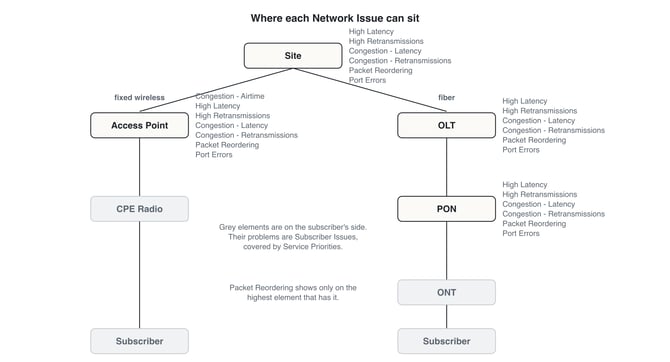
A Site that serves both fiber and fixed wireless has two rows, one for each technology, because the Services behind it are counted separately for each.
The Network Issues
Each Issue is judged at the element from its own readings. The Measured lines in the element's Observations show each reading and the cut-offs it is judged against.
Congestion - Airtime. The Access Point is overloaded. Its radio has little free time left to send on. This Issue exists only on Access Points, because only a radio has airtime.
Congestion - Latency. Latency climbs at peak, when the element is busiest.
Congestion - Retransmissions. Retransmissions and latency both climb at peak. On an Access Point with little free airtime, the element is out of room.
High Latency. Latency is high across the element, high next to similar elements, or high even when the element is idle. Unlike the Congestion Issues, it does not depend on load.
High Retransmissions. The element retransmits more packets than normal, or more than similar elements. Retransmissions that climb under load while latency stays flat point to loss that does not queue, such as policing, or to reordering rather than loss.
Packet Reordering. Most Services behind the element retransmit at or above the warning level while the element's latency stays flat under load. TCP counts a packet that arrives out of order as a retransmission, so the reading looks like loss but the queue says nothing is being dropped. The usual cause is traffic split packet by packet across more than one link: per-packet load balancing, or LAG or ECMP hashing that does not keep a flow on one path. Paths that differ in each direction produce the same reading. For a Site, the links to check are the backhaul and the upstream routing. For an OLT, its uplink. For an Access Point or a PON, its link to the Site. The Issue itself is always graded Warning.
Packet Reordering is shown only on the highest element that has it. When a Site and an Access Point under it both qualify, only the Site shows it, because the fault is above the Access Point. A Port Errors Issue at or above the element hides it, because errors on a port explain the retransmissions on their own.
Port Errors. A port on the element shows packet errors. It is a physical fault: the port, its optics or its cabling.
Critical and Warning
The word in brackets after each Issue says how bad the problem is at the element itself, judged against that problem's own warning and critical cut-offs. Where more than one reading points to the same problem, the worst one decides.
- Critical: at least one reading is past its critical cut-off.
- Warning: at least one reading is past its warning cut-off, and none is Critical.
Retransmissions are the exception. A retransmission reading past its critical cut-off stays at Warning unless latency under load confirms it. Retransmissions alone can be reordering, policing or a measurement artefact, and only latency that climbs with load shows that packets are queuing and being dropped at this element.
The grade is about the element, not about the Services behind it. An element can read Warning and still have many Critical Services behind it, when the cause is further down or inside the home. The Impact Score below captures that.
Total Services and Impact Score
Total Services is every Service behind the element on the day, healthy or not. It says how far one fix reaches, not how many Services are struggling. The list opens sorted on it, highest first, so that one fix reaches the most Services.
Impact Score weighs a Service whose Service Quality reads Critical at three times one that reads Warning: three times the Critical Services behind the element, plus the Warning Services. It counts a Service whatever the cause, so a problem further down, or inside the home, still counts. Sorting on it orders the network by overall impact and churn risk. It is shown in All Columns only.
A Service is counted under every element above it. A fixed wireless Service with a Critical Service Quality adds three to the Impact Score of its Access Point and three to its Site. A fiber Service adds to its PON, its OLT and its Site. So a Site's counts are never less than any one element under it.
The list holds only elements with at least one Network Issue. An element whose own readings are clean stays off it, even when many of the Services behind it have a poor Service Quality, because then the cause is not at the element. Those Services appear in Priorities > Services with their own Priorities.